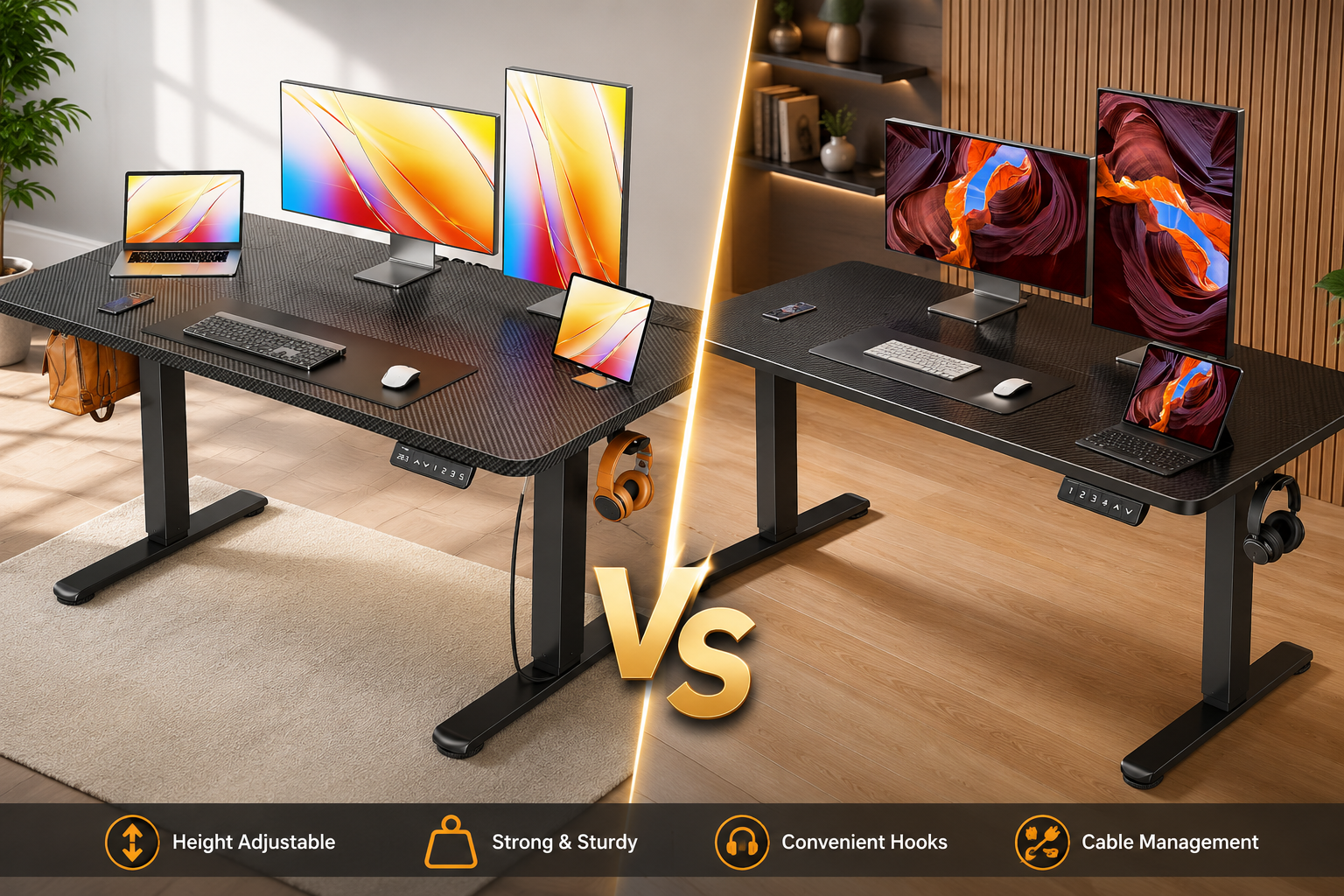
A good electric standing desk should do more than simply move up and down. It needs to provide enough workspace for your equipment, feel practical during everyday use, make height changes easy, and fit comfortably into your home office. That’s what makes the Huuger 47×24 Electric Standing Desk and ErGear 48×24 Electric Standing Desk interesting competitors. At first glance, they have a lot in common.
Both are compact electric sit-stand desks designed for home offices. Both provide four programmable height presets, use steel-frame construction, and offer enough desktop space for common laptop and monitor setups. But there’s one major difference.
The Huuger is designed around connectivity and charging convenience. The model we’re comparing includes built-in power outlets along with USB charging, including USB-C. Current Huuger listings for this 47.2×23.6-inch model specify two AC outlets, one USB-A port, one USB-C port, four memory presets, and an electric adjustment range of approximately 28.3 to 46.5 inches.
The ErGear takes a more traditional approach. Its biggest selling points are its 48×24-inch class workspace, four memory presets, steel frame, and 176-lb listed capacity. ErGear also emphasizes frame stability and repeated lift-cycle testing for its electric standing desks.
Our Top Picks at a Glance
If you want the short answer before reading the full comparison, here’s how we’d divide the two desks based on the models being compared.
| Category | Our Pick | Why |
|---|---|---|
| Best Overall | 🏆 ErGear | Strong all-around desk specifications |
| Best for Home Office | 🏆 ErGear | 48×24 workspace + 176-lb listed capacity |
| Best for Built-In Power | 🏆 Huuger | Integrated AC outlets |
| Best for USB-C Users | 🏆 Huuger | USB-C built into desk |
| Best for Device Charging | 🏆 Huuger | Power and USB access at desktop |
| Best for Memory Presets | 🤝 Tie | Both offer 4 presets |
| Best for Heavier Setup | 🏆 ErGear | 176-lb listed capacity |
| Best for Laptop Work | 🤝 Tie | Both provide practical space |
| Best for Single Monitor | 🤝 Tie | Both fit this setup well |
| Best for Gaming Convenience | 🏆 Huuger | Built-in charging adds convenience |
| Best for Small Rooms | 🤝 Tie | Nearly identical size class |
| Best Value | 💰 Check Current Price | Depends on sale pricing |
How We Tested and Compared
1. Desktop Space
We considered how much usable workspace each desk provides for realistic home-office setups.
That includes:
- Laptop
- Monitor
- Keyboard
- Mouse
- Speakers
- Notebook
- Desk lamp
- Phone
- Other accessories
The difference between 47 and 48 inches is small, so we also focus on how efficiently each desk uses its available surface.
2. Height Adjustment
An electric standing desk should make moving between sitting and standing simple.
We consider:
- Adjustment range
- Electric operation
- Control convenience
- Saved positions
- Suitability for different users
A desk with a motor isn’t automatically suitable for every body height, so buyers should always verify the exact adjustment range before ordering.
3. Built-In Power and Charging
This is where Huuger stands apart.
We evaluate whether integrated AC outlets and USB connectivity offer meaningful convenience or are simply nice extras.
For users who charge several devices daily, they can be genuinely helpful.
For someone who already has a good under-desk power strip and cable-management system, they may matter less.
4. Overall Value
Prices change frequently, particularly on online marketplaces.
Instead of permanently declaring one desk the “cheapest,” we compare the features you receive for the money.
If two desks are similarly priced, extra capacity or built-in charging may determine the winner.
If there’s a large price difference, the less expensive model may become the better value depending on your needs.
Huuger vs ErGear Comparison Table
| Feature | Huuger Electric Standing Desk | ErGear Electric Standing Desk |
|---|---|---|
| Advertised Size | 47 × 24 in | 48 × 24 in |
| Desk Type | Electric sit-stand | Electric sit-stand |
| Height Adjustment | Electric | Electric |
| Memory Presets | 4 | 4 |
| Built-In AC Outlets | ✅ Yes | — |
| USB-A | ✅ Yes | — |
| USB-C | ✅ Yes | — |
| Listed Capacity | Verify exact model | 176 lbs |
| Frame | Steel | Steel |
| Desktop Color | Black | Black |
| Laptop Setup | ⭐ Excellent | ⭐ Excellent |
| Single Monitor | ⭐ Excellent | ⭐ Excellent |
| Dual-Monitor Potential | Very Good* | ⭐ Excellent* |
| Home Office | ⭐ Excellent | ⭐ Excellent |
| Gaming | ⭐ Excellent | Very Good |
| Charging Convenience | ⭐ Excellent | Basic |
| Shared Desk Use | ⭐ Excellent | ⭐ Excellent |
| Best Feature | Integrated power + USB-C | Capacity + desk fundamentals |
| Best For | Tech-focused workspace | Regular home-office use |
| Preliminary Rating | ⭐ 4.6/5 | ⭐ 4.7/5 |
1. Huuger 47×24 Electric Standing Desk Review
Best for: Built-In Charging, Home Offices & Compact Gaming Setups
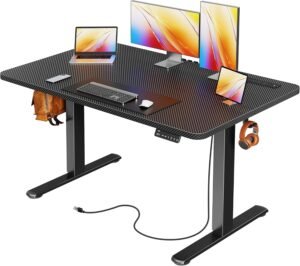
Huuger 47" × 24" Electric Standing Desk-Review
- Built-in power outlets and USB-C charging
- Smooth, quiet electric height adjustment
- Four programmable memory presets
- Strong and stable steel frame
- Excellent value for home office and gaming
- Desktop is splice-board construction
- Limited desktop size for triple monitors
- Single motor lifting system
What We Liked About the Huuger Standing DeskBest for: Home Offices, Remote Work & Heavier Computer Setups
Built-In Charging Station: Four AC outlets plus USB-A and USB-C are the standout features.
Four Memory Presets: Excellent for frequent position changes or shared workstations.
220-Lb Listed Capacity: Strong load headroom for a compact electric desk.
Practical 47×24 Size: Large enough for normal work without overwhelming a smaller room.
Quiet Motor: The listed sub-35 dB operation is appealing for shared offices and calls.
Anti-Collision Feature: Adds useful protection during height adjustment.
Steel Frame: Better suited to computer equipment than a lightweight writing desk.
Gaming-Friendly Design: Black finish, integrated charging, electric adjustment work especially well for compact gaming stations.
Where the Huuger Falls Short
- 47-Inch Width Can Become Tight: Two large monitors and several accessories can quickly consume the available space.
- 24-Inch Depth Isn’t Generous: Large monitor bases may leave less room for your keyboard and mouse.
- Integrated Power Isn’t Essential for Everyone: If you already have a well-designed power strip and cable-management system, Huuger’s biggest advantage becomes less important.
- USB-C Shouldn’t Be Assumed to Replace a Laptop Charger: The listing confirms USB-C connectivity, but buyers should verify output specifications before depending on it for high-wattage devices.
- Power Setup Still Requires Cables: Integrated outlets make connections easier to reach, but they don’t eliminate the need to power the desk and charging station.
- Compact Surface Despite High Capacity: The desk may reach its practical space limit long before a typical setup reaches the 220-lb load rating.
Who Should Buy the Huuger 47×24 Standing Desk?
Buy It If You:
- Work from home regularly
- Charge several devices at your desk
- Want built-in AC outlets
- Use USB-C accessories
- Want four saved height positions
- Have a laptop + monitor setup
- Want a compact gaming desk
- Need a desk for a bedroom or apartment
- Prefer a black workstation
- Want substantial listed load capacity without buying a huge desk
Best For:
Remote workers, gamers, students, multi-device users, and anyone who wants charging connections built directly into the desk.
Who Should Skip It?
Consider another standing desk if you:
- Need a 55- or 60-inch workspace
- Use two or three very large monitors
- Want a deeper 30-inch desktop
- Don’t care about integrated charging
- Already have excellent cable management
- Want a premium one-piece desktop
- Need confirmed high-wattage USB-C laptop charging
In those situations, a larger or more specialized standing desk could provide better value.
2. ErGear 48×24 Electric Standing Desk Review
Best for: Home Offices, Remote Work & Heavier Computer Setups
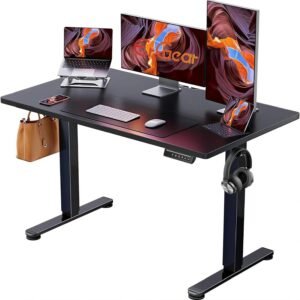
ErGear Electric Standing Desk-Review
- Smooth and quiet height adjustment
- Four programmable memory presets
- Strong 176 lb weight capacity
- Stable steel frame design
- Straightforward assembly process
- Desktop size may feel small for triple-monitor setups
- Basic control panel without USB charging
- Limited desktop finish options
- No built-in cable management tray
What We Like About the ErGear Standing Desk
Four Memory Preset : Four positions are enough for sitting, standing, an alternative position, and even another user.
176-Lb Listed Capacity : That’s enough for most normal home-office computer setups.
Practical Workspace : It’s compact enough for bedrooms and apartments without becoming too small for real computer work.
Steel Frame : The carbon-steel construction provides a solid foundation for normal office equipment.
Good Height Range : The approximately 28.35–46.46-inch range gives many users practical sitting and standing positions.
Where the ErGear Falls Short
- No Built-In Power Outlets : You’ll need your own wall outlet or power strip for computer equipment.
- No Built-In USB-C: If you frequently charge USB-C devices, Huuger provides more convenience directly at the desktop.
- 24-Inch-Class Depth : The desktop is deep enough for normal office work but can feel restrictive with large monitors.
- Limited for Large Dual-Monitor Setups :Two monitors can fit, but a wider/deeper desk is preferable for two large displays.
- Single-Motor Design :It’s appropriate for normal home-office loads, but shoppers building particularly heavy workstations may prefer a larger dual-motor desk.
Who Should Buy the ErGear 48×24 Standing Desk?
Buy ErGear If You:
- Work from home regularly
- Want four memory presets
- Use a laptop and external monitor
- Want a 176-lb listed capacity
- Need a compact home-office desk
- Prefer straightforward functionality
- Already own a power strip or USB hub
- Want a black desk for an existing setup
- Need enough capacity for typical dual monitors
- Don’t need integrated charging
Best For:
Remote workers, laptop + monitor users, small home offices, students, and buyers who prioritize basic standing-desk functionality over built-in charging.
Who Should Skip the ErGear?
Consider another model if you:
- Want built-in USB-C charging
- Want integrated AC outlets
- Need a 55- or 60-inch workstation
- Have two very large monitors
- Want a 28–30-inch-deep desktop
- Need a particularly low minimum desk height
- Want a heavy-duty dual-motor workstation
For those buyers, either Huuger or a larger standing desk may be a better match.
Who Should Buy Which Standing Desk?
Buy Huuger If You Use USB-C Devices Every Day
Best for: Modern Tech Setups
If your phone, earbuds, tablet, or other accessories charge through USB-C, Huuger’s built-in port is a genuine convenience.
You don’t need to reach behind the desk every time you want to plug something in.
Just remember that USB-C connector type doesn’t automatically mean high-wattage laptop charging. Check the exact output before relying on it for demanding devices.
For phones and smaller electronics, however, it is very practical.
Buy Huuger If You’re Building a Compact Gaming Desk
Best for: Gaming Accessories & Charging
Gamers often have more powered accessories around the desk than typical office users.
A compact setup may include:
- Gaming monitor
- Laptop or PC
- Headset
- Controller
- Phone
- Speakers
- RGB accessories
Huuger’s integrated power connections make this easier to organize.
The black finish also fits naturally with most gaming equipment.
Gaming Pick: Huuger
Buy Huuger If You Hate Reaching Under the Desk
Best for: Convenience
This sounds minor, but it matters in daily use.
If your wall outlet or power strip sits behind the desk, plugging in a charger can be annoying.
Huuger’s built-in power area keeps frequently used connections within easier reach.
If you constantly connect and disconnect devices, this alone may justify choosing Huuger.
Buy ErGear If You Want a Straightforward Home-Office Desk
Best for: Remote Work & Daily Productivity
The ErGear makes more sense if your priority is simply getting a reliable electric standing workstation without extra electronics built into the desktop.
You still get:
- Electric height adjustment
- Four memory presets
- 176-lb listed capacity
- Steel frame
- Compact 48×24-class workspace
If you already own a good power strip, USB hub, or cable tray, you may not gain much from Huuger’s integrated charging.
In that case, ErGear’s simpler design is more appealing.
Our Pick: ErGear
Buy ErGear If You Already Have Good Cable Management
Best for: Existing Office Setups
Some buyers already have:
- Surge protector
- USB charging hub
- Under-desk cable tray
- Monitor-arm cable routing
- Dedicated laptop charger
If that’s you, built-in power outlets may be unnecessary.
ErGear gives you the desk functionality without duplicating charging features you already own.

How to Choose the Right Electric Standing Desk
Selecting an electric standing desk has more to do than simply finding a desk that adjusts up and down. A good desk should suit your body height, computer setup, available room, daily work habits, and future equipment. There are six buying factors to consider when comparing the Huuger 47×24 Electric Standing Desk and the ErGear 48×24 Electric Standing Desk.
1. Choose the Right Desktop Size
Start by deciding how much workspace you actually need.
A 47- or 48-inch-wide desktop is a practical size for most compact home offices. It should work particularly well for a setup such as a laptop plus one external monitor, keyboard, mouse, phone, and a few accessories. if you only use a laptop, either desk should provide plenty of room.
Dual monitors require more planning. Two medium displays can work, especially with a monitor arm, but two large monitors with wide factory stands can quickly make a 47–48-inch desktop feel crowded.
Think about future upgrades too. If you’re planning to add large speakers, a desktop PC, a second monitor, or streaming equipment, a 55- or 60-inch standing desk may be the smarter long-term purchase.
Best for compact workstations: Huuger or ErGear
Best for very large setups: Consider a larger desk
2. Check the Height Adjustment Range
A standing desk is only good if it fits you well both sitting and standing.Don’t believe that an electric desk that’s height adjustable will suit all users.
When you sit, your keyboard should be at a level where you can type comfortably without having to lift your shoulders. You should also be able to work standing up without having to bend too much over your desk. This is especially important for users who are very short or very tall. Before you buy, measure your ideal seated and standing desk heights and compare these to the precise adjustment range of the model you’re considering. This is more reliable than simply picking on your overall height.
3. Consider Weight Capacity and Stability
Think about everything that will sit on your desk—not only your computer.
Your total workstation might include:
- Monitor
- Second monitor
- Monitor arms
- Laptop
- Desktop computer
- Speakers
- Docking station
- Microphone
- Desk lamp
- Books
- Other accessories
The ErGear model in this comparison has a listed capacity of 176-lbs, so there’s plenty of headroom for many typical home-office setups.
The Huuger configuration we’ve been comparing is listed as an even higher capacity, but exact ratings can vary by Huuger size and revision, so check the specific listing before you buy.
More capacity is good, but don’t choose purely based on the biggest number.
If you have a compact 47-48 inch desk, you might run out of usable desktop space before you reach the max weight limit.
Stability depends on how the frame is designed , how it is built , what kind of floor it is on , what is on the desk and how high you raise the desk.
BUYING TIP NO MORE: Don’t discount desktop depth
Width is the main focus but depth can be just as important.
The desks are approximately 24 inches deep.
That’s enough for many laptop and monitor setups but a deeper desktop can provide more distance between your eyes and a big monitor.
If you have a big display with a thick stand, 24 inches might feel tighter than you think.
A monitor arm is nice because it frees up some desk space and you can position the screen more flexibly.
If you have large monitors, a desktop 28 to 30 inches deep can give you a roomier experience.
Frequently Asked Questions-
1. Which is better, Huuger or ErGear?
Both are good choices, but they serve slightly different buyers.
Huuger is better if you prioritize built-in power, USB-C convenience, and a tech-friendly workstation. The model in this comparison combines electric adjustment and four presets with integrated charging.
ErGear is better if you want a simpler home-office desk focused on electric adjustment, four saved heights, a steel frame, and a 176-lb listed capacity. The ErGear 48×24 model has an actual listed top size of 47.2×23.6 inches.
For most buyers, the right choice depends more on whether you value built-in charging than on basic workspace size.
2. Is the Huuger standing desk good for working from home?
Yes. The Huuger is particularly appealing for a home office where you regularly use several electronic devices.
Its compact desktop is suitable for common setups such as:
Laptop + monitor + keyboard + mouse
The integrated power connections are also useful for keeping chargers within easy reach.
If your work involves a large multi-monitor workstation, however, you may prefer a wider 55- or 60-inch desk.
3. Is the ErGear 48×24 standing desk good for working from home?
Yes. Home-office use is one of ErGear’s strongest applications.
The 48×24 model provides a 47.2×23.6-inch actual desktop, four programmable presets, a 28.35–46.46-inch adjustment range, single electric motor, carbon-steel frame, and 176-lb listed capacity.
That’s a practical combination for remote workers using a laptop, external monitor, or other typical office equipment.
4. Which desk has more workspace?
They’re effectively in the same size category.
Huuger is marketed as a 47×24-inch desk, while ErGear is marketed as 48×24 inches. ErGear’s actual published desktop dimensions are 47.2×23.6 inches.
The small size difference shouldn’t be the deciding factor.
For everyday use, consider them both compact 48-inch-class workstations.
5. Do both desks have memory presets?
Yes. The models compared in this article offer four programmable height presets.
ErGear officially lists four saved positions for its 48×24 model.
Four presets can be used for positions such as:
- Sitting
- Standing
- Alternative working height
- Second user
This is especially convenient if you frequently switch positions throughout the day.
6. Which is better for a laptop and monitor?
Tie
This is arguably the ideal workstation configuration for both desks.
A laptop plus one external monitor leaves enough room for a keyboard, mouse, phone, and smaller accessories.
Huuger gives you better charging convenience.
ErGear gives you a simpler traditional workstation.
Neither has a major workspace advantage here.
7. Huuger vs ErGear: Which offers better value?
It depends on current pricing and what features you actually need.
Huuger offers better value if you want:
Built-in AC power, USB-C connectivity, multiple charging options, and a tech-focused workstation.
ErGear offers better value if you want:
A straightforward electric desk with four memory presets, a 176-lb listed capacity, and no need for integrated charging.
Because prices and promotions can change, compare the live prices before buying rather than assuming one model will always be cheaper.
8.Huuger vs ErGear: Which one should I buy?
Choose Huuger if:
You want built-in power, USB-C convenience, four presets, easier device charging, or a compact gaming/tech workstation.
Choose ErGear if:
You want four memory presets, a 176-lb listed capacity, straightforward electric adjustment, and a traditional home-office setup.
For a laptop-plus-monitor workstation, either can work very well.
The deciding question is simple:
Will you regularly use Huuger’s built-in charging features?
If yes, Huuger is probably the better fit.
If not, ErGear’s simpler approach makes a lot of sense.
Final Verdict — Huuger vs ErGear Electric Standing Desk: Which One Wins?
So, after comparing the Huuger 47×24 Electric Standing Desk vs. ErGear 48×24 Electric Standing Desk, it comes down to whether you want a little extra convenience or plain simplicity.
Most home-office users want the basics, and both desks deliver on that. You get electric height adjustment, four memory presets, compact desktop and steel-frame construction. The biggest difference is that Huuger adds built-in AC power and USB-C connectivity, while ErGear keeps things simple with a 176-lb listed capacity and a traditional electric standing desk design. ErGear officially measures its 48×24 model at 47.2×23.6 inches, with a height range of 28.35–46.46 inches, four presets, and a 176-lb capacity.
Why Huuger Wins-
1. Built-In Power Is Genuinely Useful
Huuger’s biggest advantage is easy to understand.
You don’t have to depend entirely on a power strip sitting on the floor or mounted underneath your workstation.
Built-in AC outlets give you convenient access for commonly used devices, while USB and USB-C connectivity make charging smaller electronics easier. The compared Huuger model is specifically highlighted for its integrated power station.
That can be useful for a:
- Laptop charger
- Phone
- Tablet
- Headphones
- Desk lamp
- Gaming controller
For a tech-heavy workspace, this is more than a decorative extra.
2. Huuger Is Better for Multi-Device Workspaces
A modern home-office desk often holds more electronics than just a computer.
You might have your monitor plugged in while charging your phone, headphones, tablet, or another accessory.
That’s exactly where Huuger makes the most sense.
The integrated charging system helps reduce the need to constantly reach behind or underneath the desk.
Winner for Device Convenience: Huuger
3. Better Choice for Gaming
Winner: Huuger
If you want one desk for both work and gaming, Huuger has another advantage.
Gaming setups can involve several accessories:
- Controller
- Headset
- Phone
- Speakers
- Gaming laptop
- USB accessories
Having power and charging connections close to the desktop can simplify this setup.
ErGear can certainly work as a gaming desk, but Huuger’s integrated connectivity makes it more convenient for a device-heavy station.
Where ErGear Is Better
Huuger winning overall doesn’t mean everyone should choose it.
In fact, ErGear may be the smarter purchase for a traditional home office.
1. ErGear Keeps Things Simple
ErGear doesn’t try to turn the desk into a charging station.
Instead, the 48×24 model concentrates on the fundamentals:
Electric adjustment
Four memory presets
176-lb listed capacity
Carbon-steel frame
47.2×23.6-inch actual desktop
28.35–46.46-inch adjustment range
If you already have a good surge protector, USB hub, and cable tray, you may not need Huuger’s biggest advantage.
Buy Huuger if you want a more feature-rich standing desk with built-in power and USB-C convenience.
Buy ErGear if you want a simpler electric standing desk and already have your charging and cable management handled.
The reason is simple: it delivers the basic sit-stand functionality while adding useful power and USB-C connectivity. You still get four saved height positions, but the integrated charging system gives Huuger something ErGear's basic 48×24 model doesn't provide.
That said, this is not a one-sided comparison.
The ErGear 48×24 remains an excellent choice for straightforward home-office productivity. Its official specifications include four memory presets, a 176-lb capacity, carbon-steel construction, and a practical 47.2×23.6-inch desktop.